
How do I redeem my CSB Rewards points and discounts?Updated 3 months ago
How do I earn and redeem CSB Rewards points?
To earn and redeem CSB Rewards points, simply log in to your CSB account here.
Your current points balance will appear in the pop-up bar on the left side of the screen. Click “MY REWARDS” to view your available rewards, tier, and redemption options.
How to redeem points at checkout
Once you’re ready to check out:
Add your items to cart
Go to the checkout page
Your rewards balance will appear on the right-hand side under your order summary
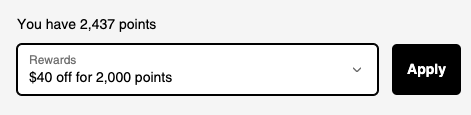
Select the reward you’d like to apply before completing your purchase
If you’ve already redeemed a reward for a coupon code, it will not appear again in the checkout rewards menu. Be sure to save your code for future use.
Redeeming via the CSB app
To access and redeem your rewards in the CSB app:
Log into your account
Tap “My Account” on the bottom menu
Select “My Rewards” to view your balance, tier, and available rewards
You can redeem directly in the app, however we recommend applying rewards at checkout for the smoothest experience.
To redeem at checkout via the app:
Add items to your cart
Go to the cart page
Tap the star rewards icon in the top right corner
Select your reward to apply it to your order
Important information
Rewards codes cannot be combined with other discounts, promotions, or bundle offers
A minimum spend of $79 USD is required to redeem rewards
If a rewards code is missing, please contact us at [email protected] and we can reissue it or refund your points so you can redeem again
If your code isn’t working, it may have already been used or applied to a previous order — try refreshing your account or app
If you continue to experience issues, our Customer Service team is happy to help
We’re here to make sure you get the most out of your CSB Rewards experience.